How to Import Articulate Rise Courses into ScormStack
Migrate your existing Articulate Rise courses to ScormStack. Convert SCORM packages and continue editing in a modern, affordable authoring tool.
Already have courses built in Articulate Rise? Maybe your subscription lapsed, or you're looking for a more budget-friendly authoring tool. Either way, you don't have to start from scratch.
ScormStack can import Articulate Rise SCORM exports and convert them into editable courses. You get your content back—and the freedom to edit, update, and re-export without an ongoing Rise subscription.
What you'll need
Before you begin:
- Your Rise SCORM export — A ZIP file exported from Articulate Rise (SCORM 1.2 or 2004)
- A ScormStack account — Free tier works for testing, though Pro unlocks full import capabilities
That's it. No complicated setup or third-party converters required.
How the import works
ScormStack's import system analyzes your Rise SCORM package and converts it into native ScormStack format:
- Upload your SCORM ZIP — Use the import dialog in ScormStack
- Automatic parsing — ScormStack reads the course structure, sections, lessons, and content blocks
- Content conversion — Rise blocks map to equivalent ScormStack blocks
- Media extraction — Images, videos, and audio files are imported to your media library
- Theme detection — Brand colors and styling are extracted where possible
The result is a fully editable course in ScormStack that you can modify, extend, and export fresh.
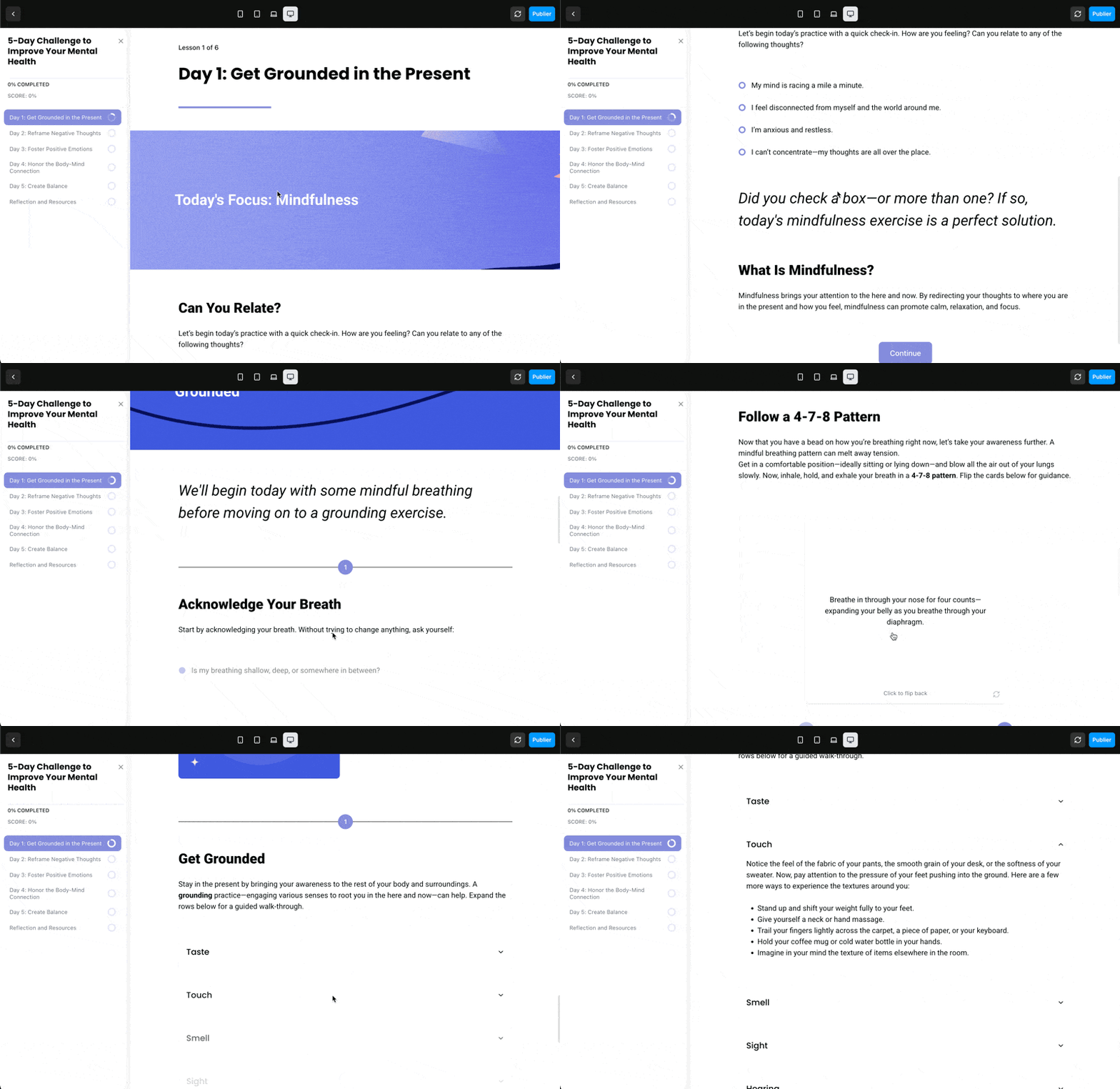
Example of imported course "5-Day Challenge to Improve Your Mental Health"
Complete block conversion reference
ScormStack's Rise converter handles an extensive range of content types. Here's the complete mapping:
Text Blocks
| Rise Block | Rise Variant | ScormStack Block |
|---|---|---|
| Text | Heading | Text Block (heading) |
| Text | Subheading | Text Block (subheading) |
| Text | Paragraph | Text Block (paragraph) |
| Text | Heading + Paragraph | Text Block (heading with paragraph) |
| Text | Subheading + Paragraph | Text Block (subheading with paragraph) |
| Text | Two Column | Text Block (two columns grid) |
| Text | Impact (a, b, c, d) | Text Block (styled 32px italic) |
| Text | Impact Note | Callout Block |
| Quote | Pull / Block | Text Block (blockquote styled) |
List Blocks
| Rise Block | Rise Variant | ScormStack Block |
|---|---|---|
| List | Numbered | List Block (numbered) |
| List | Bulleted | List Block (bullet) |
| List | Checkboxes | List Block (bullet with circle markers) |
Image Blocks
| Rise Block | Rise Variant | ScormStack Block |
|---|---|---|
| Image | Hero | Image Block |
| Image | Full | Image Block (full width) |
| Image | Text Aside | Image Block (with text) |
| Image | Text Overlay | Image Block (text on image with overlay) |
| Gallery | Centered | Image Carousel |
| Gallery | Two Column | Image Grid (2 columns) |
| Gallery | Three Column | Image Grid (3 columns) |
| Gallery | Four Column | Image Grid (4 columns) |
Multimedia Blocks
| Rise Block | Rise Variant | ScormStack Block |
|---|---|---|
| Multimedia | Video | Video Block |
| Multimedia | Audio | Audio Block |
| Multimedia | Embed (YouTube) | Video Block (YouTube) |
| Multimedia | Embed (Vimeo) | Video Block (Vimeo) |
| Multimedia | Embed (Other) | Embed Block (iframe) |
| Multimedia | Code | Text Block (preformatted code) |
| Multimedia | Attachment | Resources Block |
Interactive Blocks
| Rise Block | Rise Variant | ScormStack Block |
|---|---|---|
| Interactive | Accordion | Accordion Block |
| Interactive | Tabs | Tabs Block |
| Interactive | Labeled Graphic | Interactive Image Block (with hotspots) |
| Interactive | Process | Flow Block |
| Interactive | Timeline | Flow Block |
| Interactive | Sorting | Categorization Block (drag & drop) |
| Interactive | Flashcard | Flashcards Block (stack) |
| Interactive | Stack | Flashcards Block (stack) |
| Interactive | Button | Navigation Button Block |
| Interactive | Button Stack | Text Block (with button links) |
| Interactive | Storyline | Embed Block (iframe) |
| Interactive | Scenario | ⚠️ Not supported (requires manual rebuild) |
Knowledge Check & Quiz Blocks
| Rise Block | Question Type | ScormStack Block |
|---|---|---|
| Knowledge Check | Multiple Choice | Assessment Block (multiple choice) |
| Knowledge Check | Multiple Response | Assessment Block (multiple response) |
| Knowledge Check | Fill in the Blank | Assessment Block (text response) |
| Knowledge Check | Matching | Matching Block |
| Quiz Lesson | Multiple Choice | Assessment Block (multiple choice) |
| Quiz Lesson | Multiple Response | Assessment Block (multiple response) |
| Quiz Lesson | Fill in the Blank | Assessment Block (text response) |
| Quiz Lesson | Matching | Matching Block |
| Quiz Lesson | Question Bank | ⚠️ Not supported (add questions manually) |
Divider & Navigation Blocks
| Rise Block | Rise Variant | ScormStack Block |
|---|---|---|
| Divider | Continue | Navigation Button Block |
| Divider | Divider | Separator Block |
| Divider | Numbered Divider | Separator Block (numbered) |
| Divider | Spacing Divider | Separator Block (invisible spacing) |
Additional Conversions
The import process also extracts:
- Course structure — Sections and lessons maintain their hierarchy
- Media files — All embedded images, videos, and audio
- Theme colors — Primary and accent colors from your Rise branding
- Block formatting — Padding, width, and background settings are preserved
- Background images — Block backgrounds with images and overlays
Blocks requiring manual attention
Some Rise features don't have direct ScormStack equivalents. The import system flags these with warnings:
| Rise Feature | Recommendation |
|---|---|
| Scenario blocks | Rebuild branching logic with Flow blocks |
| Chart blocks | Export as image or recreate with embedded content |
| Question banks | Add individual questions manually |
| Storyline embeds | May work as iframe, but requires testing |
The import summary shows exactly what converted successfully and what needs review.
Step-by-step import guide
1. Export from Articulate Rise
In Rise 360:
- Open your course
- Click Export
- Choose SCORM (1.2 or 2004)
- Download the ZIP file
2. Import into ScormStack
In ScormStack:
- Go to Courses → Import
- Select "SCORM Package" as the source
- Upload your Rise export ZIP
- ScormStack detects it as a Rise course and uses the appropriate converter
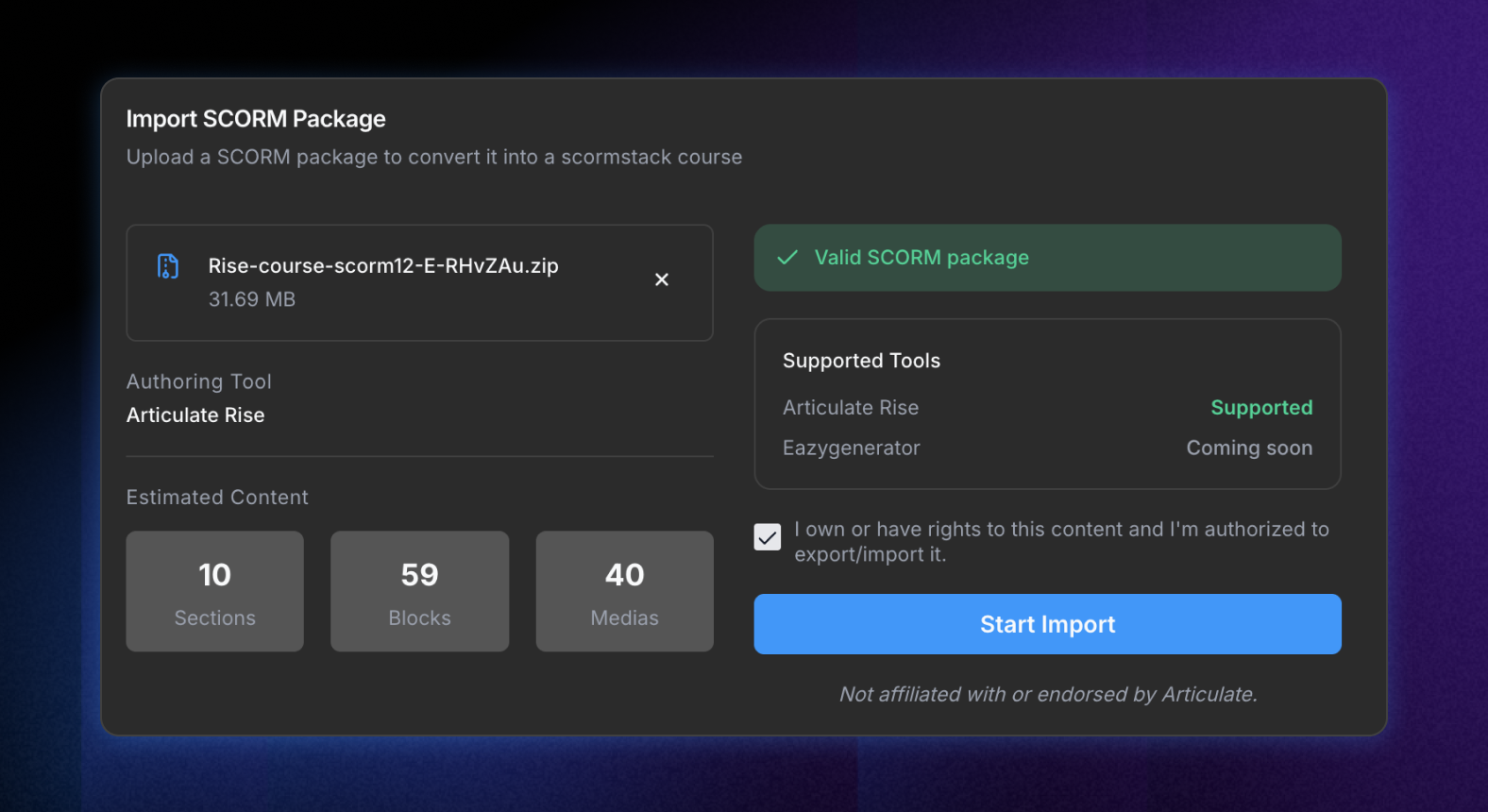
3. Review the import
After import completes:
- Check the import summary for any warnings or errors
- Preview the course to verify content appearance
- Make any necessary adjustments to converted blocks
4. Continue editing
Your course is now a native ScormStack project. You can:
- Edit any content block
- Add new sections and lessons
- Update branding with ScormStack's theme system
- Export to SCORM 1.2, SCORM 2004, or HTML
Why migrate from Rise?
There are several reasons teams move to ScormStack:
Cost savings — Rise 360 requires an annual subscription per seat. ScormStack offers transparent monthly pricing that's significantly more affordable for individuals and small teams.
No lock-in — Once you import to ScormStack, your course is yours. Export to SCORM and host it anywhere.
Simpler workflow — ScormStack focuses on what matters: building courses and exporting clean SCORM packages. No ecosystem complexity.
Continued access — Even if you cancel, your exported packages work forever in any compliant LMS.
EasyGenerator import too
ScormStack doesn't just support Rise. You can also import courses from EasyGenerator using the same process. The dedicated EasyGenerator converter handles that platform's specific structure and block types.
Preserve your investment
Switching authoring tools doesn't mean losing your existing content. ScormStack's import capability protects your course investment and gives you a path forward—without rebuilding everything from scratch.
👉 Try ScormStack free and import your first Rise course today.