ScormStack's WCAG Accessibility Support Was Built In From Day One
ScormStack has treated WCAG accessibility as a product foundation from day one, with semantic course structure, alt text, captions, keyboard access, and a public FastPass report.
Accessibility is not a feature we switched on after launch.
From day one, ScormStack was built around a simple idea: online training should be usable by more people, on more devices, with fewer assumptions about how a learner sees, hears, navigates, or processes information.
That matters for compliance. It also matters for learning quality. A course that only works for a mouse user on a perfect screen in a quiet room is not a resilient course. It is fragile content.
ScormStack helps teams create WCAG-aligned learning experiences by making accessible structure part of the normal authoring workflow: semantic headings, text alternatives, caption-ready media, keyboard-friendly navigation, clear labels, and consistent content patterns.

Accessibility should not be a retrofit
Many digital products treat accessibility as a late-stage audit problem. Build the interface first, test it later, then patch whatever fails.
That approach is expensive and, more importantly, unreliable. Once a course has been designed around visual-only meaning, mouse-only interactions, unlabeled media, and inconsistent structure, accessibility becomes cleanup work.
ScormStack takes the opposite approach. The learner player and authoring model were designed so accessibility is part of the course architecture:
- Headings carry structure, not just visual style
- Images can include alt text where the author knows the learning context
- Video and audio blocks are caption-ready
- Navigation and controls are designed for keyboard use
- Content blocks encourage readable, predictable layouts
- Exported courses preserve semantic HTML where it matters
The goal is not to make accessibility feel like a separate technical project. The goal is to make the accessible path the default path.
Evidence: FastPass report for a ScormStack course
On April 29, 2026, we tested a ScormStack course using Accessibility Insights for Web FastPass.
The report was generated against a ScormStack-hosted preview course and produced the following summary:
| Result type | Count |
|---|---|
| Failed instances | 0 |
| Incomplete checks | 0 |
| Passed checks | 45 |
| Passed tab-stop checks | 5 |
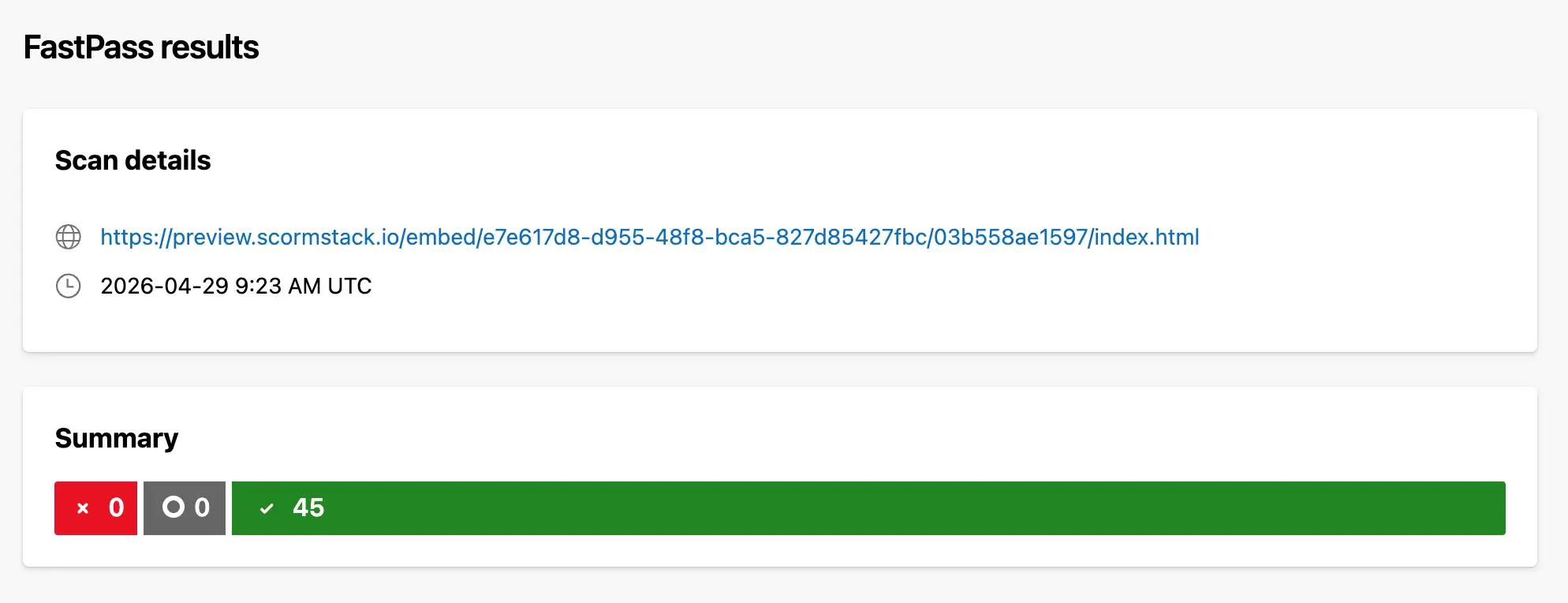
You can view the public report here:
ScormStack WCAG FastPass report - April 29, 2026A FastPass report is not the same as a full manual WCAG conformance audit for every possible course a customer may create. Course authors still control their own content, text, media, colors, and instructional choices.
But the report is useful evidence of the platform foundation: the player and generated course output passed FastPass with 0 failed instances, 0 incomplete checks, and 45 passed checks.
That includes the full set of tab-stop checks in the report:
- Keyboard navigation: interactive elements can be reached using Tab and arrow keys
- Keyboard traps: focus does not get trapped inside an interaction
- Focus indicator: interactive elements show visible focus
- Tab order: focus follows the logical visual order
- Input focus: focus does not move unexpectedly without learner action
That distinction matters. Accessibility is not only a scanner score. It includes automated validation, manual keyboard testing, assistive technology testing, and responsible authoring.
What WCAG support means in ScormStack
WCAG is not a badge you add to a homepage. It is a set of design and implementation decisions that show up in the learner experience.
In ScormStack, those decisions appear in practical places:
Text alternatives for images
Authors can add alt text to images so learners using screen readers can access the meaning of visual material. This is especially important in training, where an image is often not decorative. It might be a process diagram, a product screenshot, a safety example, or a compliance scenario.
Semantic content structure
Courses are built from structured blocks rather than loose visual fragments. Headings, paragraphs, lists, media, assessments, and navigation each have a clearer role. That structure helps assistive technologies present the course in a navigable way.
Caption-ready media
Video and audio can carry captions or text alternatives so spoken content does not become inaccessible content. Captions help Deaf and hard-of-hearing learners, but they also help non-native speakers, learners in noisy environments, and anyone reviewing training without sound.
Keyboard-accessible navigation
Learners should be able to move through a course without relying only on a mouse or trackpad. Keyboard access supports screen reader users, learners with motor impairments, and people using alternative input devices.
Consistent player patterns
Accessible learning is easier when controls behave predictably. ScormStack keeps the learner player focused and consistent so course navigation, assessment actions, and media controls are easier to understand and test.
Accessibility is also AI readiness
Accessibility work has another practical benefit: it makes learning content more understandable to machines.
That does not replace the human reason for doing it. Inclusion comes first. But the overlap is real.
When a course has useful alt text, an AI system has text it can index for visual content. When a course uses a proper heading hierarchy, retrieval systems have cleaner sections to chunk and search. When a video has captions, spoken knowledge becomes searchable and reusable. When buttons, labels, and navigation are explicit in the markup, automated systems can understand the course with less guesswork.
The shared principle is simple: make meaning explicit.
If meaning only exists in visual placement, color, or a human designer's intent, both assistive technology and AI systems have to infer too much. If meaning is present in the structure, more people and more tools can use it.
That is why accessibility should not be treated as a checkbox next to a separate "AI readiness" project. In many cases, the same structural choices serve both goals.
The business case is not separate from the ethical one
Accessibility is the right thing to do because learners are different. Some use screen readers. Some use keyboards. Some need captions. Some need clearer structure. Some are temporarily injured, learning in difficult environments, or using older devices.
Designing for those learners is not charity. It is competent product work.
It also creates business value:
- Training reaches more employees, customers, and partners
- Buyers have clearer evidence for procurement and compliance reviews
- Course content is easier to maintain, translate, search, and reuse
- Teams avoid expensive accessibility remediation after content is already shipped
- Learning assets become more useful for AI-assisted search and support workflows
The best version of accessibility is not a last-minute promise. It is a product habit.
Built in, and still improving
ScormStack has supported WCAG-aligned course creation from the beginning, but accessibility is never "done" in a permanent sense. Standards evolve. Browsers change. Assistive technologies improve. Customers build more complex courses.
Our commitment is to keep treating accessibility as part of the foundation:
- Keep the learner player clean, semantic, and testable
- Keep improving content blocks with accessible defaults
- Keep making alt text, captions, and structure natural for authors
- Keep publishing evidence when we run accessibility checks
- Keep listening when customers or learners find real-world friction
That is the standard we want for e-learning: not accessibility as a late announcement, but accessibility as a default expectation.
ScormStack was built this way from day one.